
2026-09-15 · automation / video / web3 / vibatchium
Filming a wallet demo on a machine with no screen
A minute of product demo for a web3 app, driven by a real MetaMask wallet signing real transactions against a forked chain, recorded on a headless Linux box. A fake X display, a blockchain with a twenty five minute shelf life, and one limit I could not engineer around.
StockRip needed a demo clip, and the only machine that can run it properly has no monitor. I reach that box over SSH. The wallet in the clip had to be a real MetaMask signing real transactions rather than a mock, and none of it could spend real money.
None of those is hard alone. Together they took an afternoon, most of which went on finding out which parts of the problem were not the parts I thought.
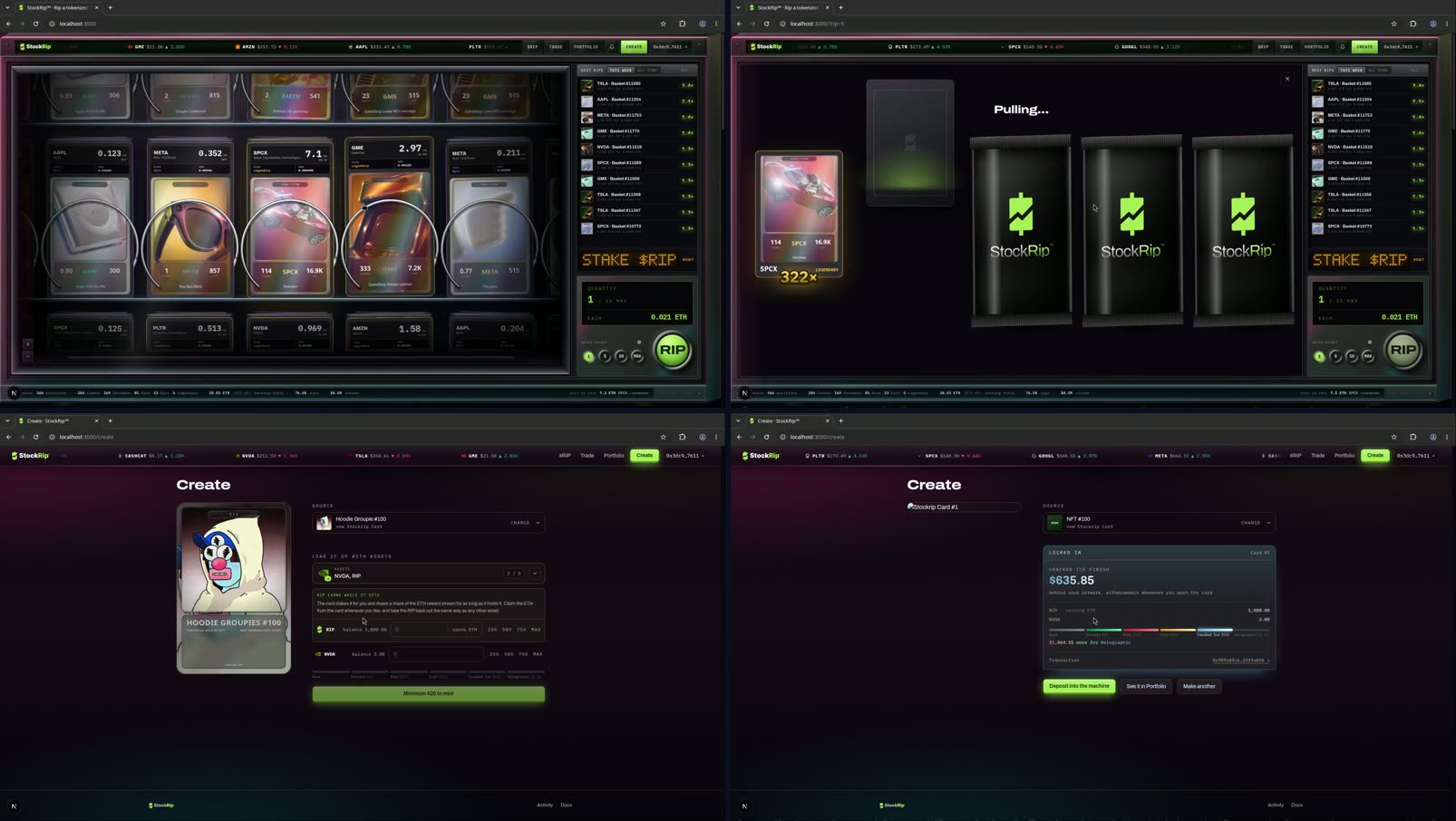
The rig
A monitor is not a prerequisite for a display. Xvfb gives you an X server backed by nothing at all, Chrome renders into it perfectly happily, and ffmpeg's x11grab reads the framebuffer straight back out.
Three traps in that setup, none of them documented anywhere obvious.
The first headed launch died instantly with Failed to connect to Wayland display. The box runs a GNOME Wayland session, so WAYLAND_DISPLAY is set in the environment, and Chrome's ozone layer prefers it over DISPLAY without asking. Setting DISPLAY=:99 is not enough; the Wayland variables have to be unset so Chrome has nothing else to reach for.
Then the viewport turned out not to be the window. I set the viewport through the automation API, read it back, got the number I asked for, and was recording an 800x600 window. Setting a viewport emulates device metrics over the devtools protocol and does not resize the OS window, and with no window manager running there is nothing to honour a maximise request either, so Chrome falls back to the bounds saved in its own profile. The fix was to patch browser.window_placement in that profile's Preferences before launch, and restore it byte-identical afterwards, since the profile belongs to a wallet I did not want to disturb. Chrome then opened at 1919x1079 rather than the 1920x1080 I asked for, which I never got to the bottom of and which cost me one black pixel on two edges.
The third was Chrome's yellow "you are using an unsupported command-line flag" bar, which appears because of a stealth flag and which --disable-infobars does not suppress. I was about to crop the top 140 pixels out of every frame before noticing that a fresh tab does not have the bar at all. Open a new tab, close the old one, record in the clean one.
Not spending real money
The app is live on a real chain, and a pull from its pool costs whatever the pool price is. So the recording ran against an anvil fork of mainnet, which keeps the same chain id and the same core contracts, with state that can be rewritten for free. The newer vault contracts are not on mainnet yet, so those get deployed onto the fork from vendored bytecode at fixed addresses, which the app already knows to prefer when it sees a fork RPC configured.
Getting the wallet onto it took longer than expected. MetaMask 13 keeps several RPC endpoints per network and lets you choose which is active, so the fork slots in as another endpoint on the existing network rather than as a second network with a clashing id. I triggered the add through a two-line local page calling wallet_addEthereumChain, confirmed it in the extension, and then had to go into the network settings by hand to select the new endpoint, because adding one does not switch to it. The check that it had worked was not the chain id, which is identical on both sides. It was the balance: 0.0769 ETH on the real chain, 32 ETH on the fork.
I also funded the real wallet address on the fork rather than import anvil's well-known dev key into MetaMask. It leaves the wallet untouched and it puts the actual address on camera instead of a test account everybody recognises.
The repo does ship a one-click alternative, an EIP-6963 provider called "Fork Demo (anvil)" that appears in the app's own wallet picker and signs through the fork with no extension involved. It exists precisely so nobody has to do the paragraph above. I did the paragraph above anyway, because a demo of a wallet-native product that quietly uses a stub wallet is a demo of something else.
Two things still had to be worked around.
The randomness cannot be forked. Draws settle through a VRF service that is itself on chain, but the keeper that reveals the randomness is not, and a fork has no keeper listening. What saved the shoot was a dev path already in the app: ?rip=N plays the whole sequence against the real pool with a faked keeper, and the comment above it notes that it is deliberately keyed off the same state the live path uses, so it drives the real code rather than a parallel copy. The same comment says "remove before a public launch", which I am glad I never got round to.
And the fork setup kit had rotted. Two of its hardcoded addresses no longer hold: the account it impersonates to grant a role is not the token owner any more, so that step reverts with Unauthorized, and the token-bound account it borrows stock tokens from has since been emptied, so that step dies with ERC20InsufficientBalance. Neither is a bug in the kit as written. Both are what happens when you pin addresses on a chain that keeps moving. I found live holders through the block explorer's API instead, which is Cloudflare-walled, and so exactly the case the fetch lane exists for.
The pruning clock
The public RPC this forks from is non-archive with a state window of roughly twenty to thirty minutes. Anything the fork never touched becomes unreachable once that window closes. The kit's README documents this under a heading in bold and advises, correctly, not to debug it.
It bit me mid-mint, about twenty five minutes in, as a contract read that had worked ten minutes earlier coming back allowance ... reverted: metadata is not found, 63141664.
The recovery is unintuitive enough to be worth stating. Restart anvil with --fork-url and --load-state together, not either one: the saved state carries every deploy, balance and approval you built, and the fork URL re-anchors it at a fresh block upstream has not pruned yet.
Then two things have to be re-run, because a state dump carries state but no block history. The cache warm-up, since every read the old fork had pinned is gone. And anything whose discovery works by reading event logs. In this app, on a fork, the NFT picker finds your tokens by scanning Transfer logs and then confirming each one with ownerOf, because the block explorer it would normally ask indexes mainnet and cannot see a fork-local transfer. After a reload ownerOf still says you own them while the logs that announced them no longer exist, so the UI cheerfully reports an empty wallet. The fix is to send a held token to itself: a no-op in state, and exactly the log the picker is looking for.
Also, anvil writes its state dump on SIGTERM and not on SIGKILL. I got that right without knowing it mattered.
The thing I could not solve
I wanted MetaMask's confirmation popup on camera. That is the shot that separates a wallet demo from a screen recording of a website.
It never appeared. While a signature request is pending, xwininfo shows exactly one Chrome window on the display, the main one. The popup is a separate browser window, and with no window manager running there is nothing to map it. So I tried opening the extension's notification.html directly in a tab, on the theory that the pending request would render there. It comes up blank, because that UI needs the popup context it was built for.
Two takes went into learning this. The signature does happen, and the app's own "confirm 2 calls in your wallet" state plus the resulting transaction hash carry the story well enough. But the answer for next time is a window manager on the recording display, which is a five megabyte package I did not think I needed.
The mint itself was real. After the take I read ownerOf on the new vault card and the lock on the source NFT straight off the fork rather than trusting the success screen. That fork is long gone now, so you have my word for it and nothing else, which is the honest status of most things recorded against ephemeral state.
The finished clip runs 65.7 seconds at 1920x1080.
The mistake
Tearing down, I ran pkill -TERM -f "anvil --fork-url".
That pattern appears in the command line of the shell running it. So pkill matched its own parent and killed the shell. Twice, because the first time I assumed the odd exit code meant something else. Worse, a second pattern in the same teardown was loose enough to match two long-lived processes that had nothing to do with the recording, on a box that also runs a fleet of bots.
Nothing that had been listening went missing and no service failed, but I only know that because I went and checked afterwards. The habit worth building is the bracket trick, pkill -f "[a]nvil --fork-url", which matches the process and not the pattern itself. Better still: list the pids, look at what they actually are, then kill those.
I have known about that footgun for years and had never once been bitten by it, which is presumably why I was careless with it.